Automation
Note: this feature is available in the Pro edition only.The mixer sections and audio effects can be automated (i.e., the knobs can be programmed to turn automatically while the transport is running). This can be used to change a track's volume level, to add more reverb to part of a track, etc.
You can add automation by recording knob movements while the transport is running, or by using the automation editor.
A small blue square appears in the bottom right corner of an automated control. Automation can be undone by deleting all dots in the editor (click SEL ALL followed by DELETE). An automated control can still be adjusted using the mouse. This will move the entire automation curve, as it appears in the Automation Editor, up or down.

Recording fader/knob movements
Fader and roraty knob movements can be recorded while the transport is running. The Automation Recording button (near the bottom right corner of the main window) must be engaged for this. By default, the control won't return to its previous value until the transport stops ("latch mode"). The control will revert to the previous value immediately upon releasing the mouse button if the Automation Touch Mode button is engaged.
Note: automation recording is not available while the transport is cycling.
Using the Automation Editor
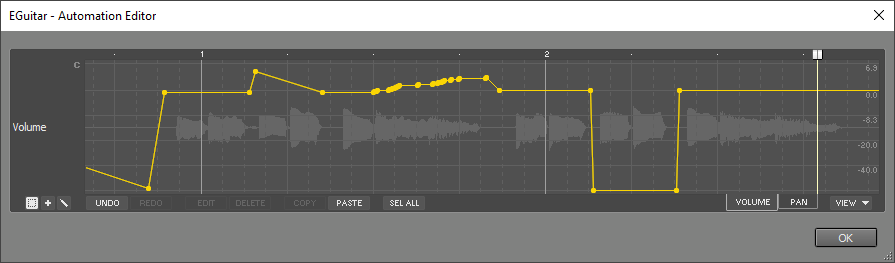 |
- Right-click the control and choose "Show Automation Editor" from the menu.
- Engage the Automation button in the bottom right corner of the main window, then click the control.
- Click the control while pressing the "A" key.
The VIEW button can be used to add tabs for other automatable parameters of the mixer section or effect. You can switch between parameters easily using the tabs.
Tip: type "used" in the VIEW menu search box to show only the automated parameters. Type "checked" to show items that have a check mark and hence appear as a tab.