Chords and Lyrics
Chords and Lyrics can be entered in the Chords Editor and Lyrics Editor respectively, which are available from the Editing Options menu. These Chords and Lyrics can be made displayed in almost any editor using the small C and L buttons that appear on the left side of the editors. The Chords appear at the top of the editor, the Lyrics appear at the bottom. The lyrics and/or chords can be displayed in the Lyrics Prompter too.
Entering Chords is quite easy, since you probably already have them on paper or in your head. Entering Lyrics takes a bit more effort because it's not always easy to determine where the bars and beats should go. It's recommended to type the lyrics first, and then add the bar separators (and optionally the beat separators).
Bars are separated by "|" characters. You can type "\" instead for convenience.
Inside a bar, beats are separated by "-" characters. This isn't required if the number of beats in the bar can be divided by the number of chords. You can, for example, use "|C F|" instead of "|C - C - F - F|".
Here are examples of chords and lyrics:
|
| |||
| Chords example | Lyrics example |
Note that any text which is not in a bar is ignored, and thus can be used to add comments. Spaces can be used anywhere you like, but not in chord names (i.e. you must type "Gsus4" instead of "G sus 4").
Since MultitrackStudio stores the tempo in MIDI files, there must be at least one MIDI track in a song in order to align the chords and lyrics with the tracks. See Extracting tempo from track if your song is audio-only.
The Lyrics Editor's Copy button copies the lyrics to the clipboard without any bar and beat separators. You can paste the lyrics into a text editor and print them.
The Chords Editor's b and # buttons can be used to transpose the selected chords. Any bass notes (separated from the chord by a slash, e.g. C/B) will be transposed as well.
Lyrics Prompter

If any chords or lyrics are available, a Lyr button appears near the bottom right corner of the main window. Clicking this button shows or hides the lyrics prompter. The lyrics prompter scrolls automatically while the transport is running, so it can be used to read the lyrics/chords while recording. Clicking a bar will move the transport position to that bar. Double-clicking a bar will pop up the Chords or Lyrics Editor and select that bar. The font size depends on the height of the lyrics prompter: if you make it taller, the font will get larger too.
If both chords and lyrics are available, subtle C and L buttons appear on the left (see picture). You can display either one or both.
Creating MIDI Tracks from Chords
Using the Add Track menu's Chord Track option, you can create MIDI tracks from the chords. Chord tracks can be used to verify the chords or to quickly create backing tracks for practicing a guitar solo, etc. Bass, Piano, Organ, Strings, Guitar, Banjo, and Drums tracks can be created.
Chord tracks are updated automatically if you edit the chords or change the time signature, etc. You can rename a track to keep it from being updated (remove the "(Chord)" part).
The following chords can be used: C, Cm, C6, Cm6, C7, Cm7, Cmaj7, Cmmaj7, Cadd9, Cmadd9, C9, Cm9, C11, Cm11, C13, Cm13, Csus2, Csus4 (or Csus), Cdim, Caug, Cdim7, Cm7b5. Any key can be used (Bbm, D7, C#maj7, etc.). Unrecognized chords will be underlined in red.
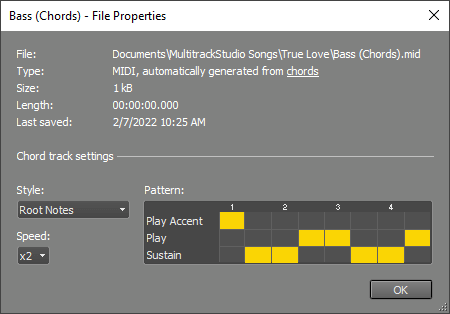
A chord track's Properties window (click the name box) offers some options to control the generated parts. The Pattern box defines the rhythm pattern. Each beat can be in one of these states:
- Play: plays new notes.
- Play Accent: plays new notes, a bit louder.
- Sustain: keeps notes played in an earlier beat sounding.
- None of the above: keeps the beat.
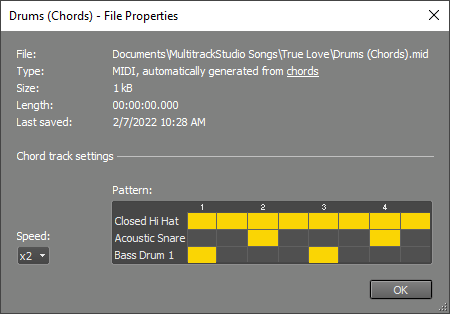
A drum track's Pattern box works differently: there are three instruments, and you can choose whether each is hit or not.
Speed controls the resolution of the Pattern box. x1, x2, and x4 equal 1/4, 1/8, and 1/16 notes respectively, x3 equals triplets.
Style offers options like Chords, Arpeggio, and Blues / Rock depending on the instrument.
Tip: To hear the results of any tweaks immediately, you can let the transport loop a couple of bars.
 |
 |