Compressor
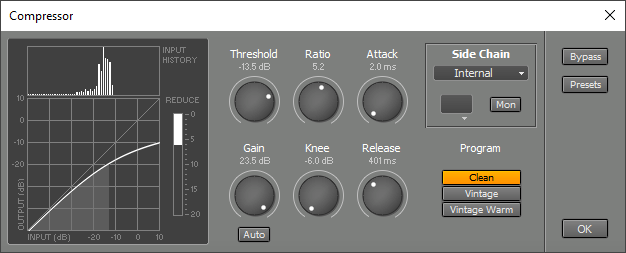 |
Threshold controls the level above which compression takes place.
Attack controls how fast the Compressor will attenuate loud signals, while Release controls the time it takes to stop attenuating after a loud signal ended. Low Release times can cause distortion at low frequencies.
Gain sets the amount of gain applied after the compressing action is done. As the Compressor attenuates loud parts the overall level drops. The Gain control compensates for this level drop. By activating the Auto Gain button the Compressor will automatically adjust the Gain control.
Program selects the program used:
- Clean is as transparent as possible. This is a 'feedforward' compressor, which is the way typical modern compressors work.
- Vintage is less transparent, but has more character. This is a 'feedback' compressor, which is the way older (tube or opto) compressors work.
- Vintage Warm is like Vintage, but modified to produce more even harmonics.
The Side Chain section is available with the Clean program only.
Typical applications of Side Chain section's effect slot are:
- Use an EQ effect to attenuate the bass frequencies in order to avoid the compressor overreacting to it, which can lead to "pumping".
- Use an EQ effect to boost certain unwanted frequencies, so the compressor attenuates them
The Reduce meter indicates the amount of gain reduction. This value appears in the effect slot itself too.
The Transfer Curve (bottom left) shows the effect of the Threshold, Ratio and Knee settings. It ignores the effect of the Gain knob. The horizontal axis represents the input, the vertical axis represents the output. The Level History (top left) shows the relative amount of time the input signal is at a certain level (the higher the bar, the more time). The Level History will be reset when either the Transport is started or the Compressor window pops up. You can reset it manually by pressing the F5 key (Windows) / Command-R (Mac).