Controller Editor
MIDI instruments can use controller messages to alter the sound they generate. A track editor's CONTR button opens/closes the Controller Editor. The editors appear in tabs, which can be added or removed using the VIEW button. The All submenu lists all controllers except for the per-note controllers, which have their own submenu. The VIEW menu itself lists all controllers that are supported by the MIDI instrument. This isn't possible for External MIDI Instruments and plugins, for those a few commonly used controllers appear instead.
Tip: type "used" in the All or Per Note submenu search box to see only the controllers that appear in the track. Type "checked" to see the items that have a check mark and hence appear as a tab.
Note: the controller editor's UNDO/REDO buttons do exactly the same as the main editor's, i.e., both work on both note and controller edits.
Note Velocity Editor
The editor that appears by default doesn't control a MIDI controller, but note velocities instead. Note velocities are represented by vertical bars which can be moved up or down with the mouse. A halo appears around the corresponding note in the pianoroll/score/drum editor so you can easily see which note the bar belongs to.The Mode buttons in the bottom-left corner provide two modes:
- Bar mode: move a bar up or down. The Shift key can be used to edit the decimal part.
- Draw mode: draw a curve to which the bars will be adjusted.
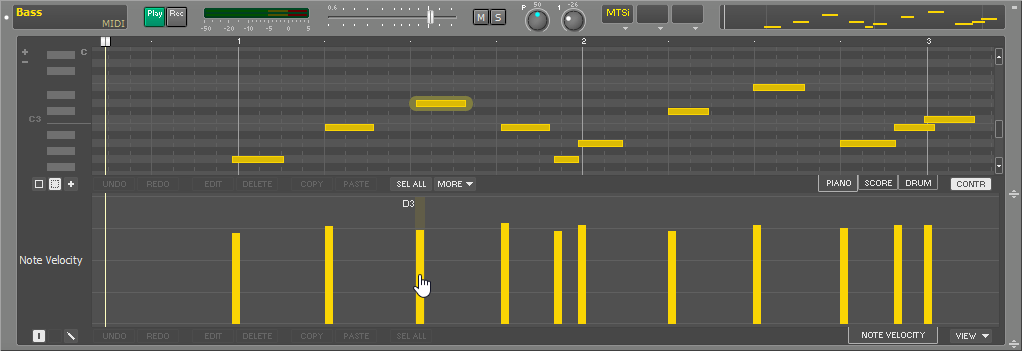
A similar "Note Off Velocity" editor is available as well.
Tip: with the Drum editor, you can make just a single instrument appear in the note velocity editor by clicking an instrument name on the left (so it's highlighted).
Controller Editors
All controller editors use dots to represent the controller value. They work just like the Automated Fader effect.
The VIEW menu lists pitch bend, aftertouch, and all MIDI controllers except for the data entry and RPN controllers (#6, #38, and #96...101).
Tip: in MultitrackStudio Instruments and External MIDI Instrument windows, you can right-click a control to click "Show MIDI controller editor" and make the corresponding editor visible.

Editors are available for NRPN parameters too.
Pitch Bend Range
The Pitch Bend editor features a small button labeled RNG=.. in the bottom-left corner (see picture below). You can click it to change the pitch bend range. Valid values are 0..96 semitones (though most synths support values up to 24 semitones only). "0" prevents MultitrackStudio from sending pitch bend range messages, use this if those messages interfere with a plugin's MIDI implementation.External MIDI Instruments won't pick up the new value until the transport is restarted. Other instruments will pick up the new value when a pitch bend message appears.
Note: External MIDI Instruments and instrument plugins may not support changing the pitch bend range.
Tip: A range of "0" prevents MultitrackStudio from sending pitch bend range messages. You can use this if such messages conflict with a plugin's MIDI implementation. It is an RPN value: in MIDI 1.0, controllers #6, #38, #100, and #101 are sent for this purpose.
Per-Note Controller Editors
The VIEW menu's "Per Note" section lists MIDI 1.0 poly aftertouch and MIDI 2.0 per-note pitch bend and registered per-note controllers.All MIDI 2.0 registered per-note controllers are available, except for #3 (absolute pitch).The picture below shows per-note pitch bend for note C5. The visible note changes automatically when a note is selected: if you click a D4 note in the pianoroll, the per-note controller editor switches to D4, for example. Alternatively, you can click the down arrow on the tab below the editor and pick a note from the list.

The per-note pitch bend editor has a pitch bend range setting, just like the channel pitch bend editor. This value is the same for all notes. It defaults to 48 semitones, which is the default value MPE uses.
Per-note controllers are updated automatically: whenever notes are moved, deleted, etc., the associated per-note controllers are updated.
SysEx Editor
SysEx (System Exclusive) messages appear in the SysEx editor.
The EDIT button pops up a list of all SysEx messages. You can modify them or add new ones. SysEx messages always start with F0 and end with F7.
You can right click a SysEx or the "+" sign to load or create presets.

Note: SysEx messages aren't tied to a MIDI channel. If a certain SysEx does contain a channel field, you have to update it manually if you change the track's MIDI channel in the MIDI Instrument window.
Tip: make sure messages like "XG On" are at position 0 (the first beat of the first bar). This allows Export MIDI Tracks to put it before any other messages.
Tip: you can drop .syx files on the SysEx editor.
The SysEx editor also supports "Sequencer Specific" meta messages. These messages start with FF7F. They'll be saved in (exported) MIDI files. They won't be sent to MIDI instruments (the MIDI specs don't allow for this).