MIDI Recording
MIDI tracks always record the MIDI In Device(s) and/or the Onscreen MIDI Keyboard, regardless of the type of MIDI instrument being used. If the Autodetect Keyboard Channel option is enabled (default) your keyboard's MIDI channel will be detected automatically. If necessary you can set the channel used in the instrument's user interface.
The Pro edition features a built-in MIDI merger that merges all data that's being received on any of the MIDI In Devices (up to four of them can be used, see devices). Make sure your keyboards are using different channels in order to avoid problems.
You can undo MIDI-recording using the track editor's Undo button.
Note: If the MIDI file contains multiple streams ('tracks' in MIDI terms) all streams will be recording. Using multiple streams is not recommended.
Onscreen MIDI Keyboard
The onscreen keyboard can be used to play MIDI instruments, it works just like a MIDI In Device. Not only does it offer a keyboard layout, but drum, chords, matrix, fourths and various string layouts as well. It can be made visible using the button in the bottom-right corner of the main window.
 |
 |
 |
 |
 |
 |
The onscreen keyboard provides suitable shortcut keys for various international keyboard layouts automatically. The number of keys which can be played simultaneously solely depends on the keyboard hardware, three keys typically isn't a problem. The mouse works too, but it isn't really suited to playing music.
Note: The Fourths layout can't be used with the keyboard. It can be used with mouse or pen.
The slider on the left can be assigned to any MIDI controller (including note velocity and pitch bend) using the Options button. The slider can be turned into a button, this may be more convenient for the sustain controller for example.
String instruments can be capoed using the Options button.
The Matrix layout can be used with the Matrix Sampler. The pad mapping conforms to the Matrix Sampler's matrix mapping. The 8 pads on the left correspond to the lower 8 cells of the Matrix Sampler, the 8 pads on the right correspond to the upper 8 cells.
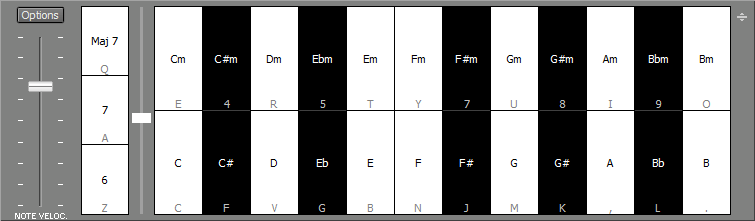
The Chords layout allows for playing chords with a single finger. It offers 12 keys for major chords and 12 keys for minor chords. You can use the 6/7/Maj7 buttons on the left to add a note to the chord. The vertical slider sets "the position of the keyboard player's hand on the keyboard".
The drum layout uses GM instrument mapping.
There's an option an create/recall presets.
Note: the onscreen keyboard's timing may not be as accurate as you'd expect from a real MIDI keyboard.
Note for users of macOS 10.13 and older: the keyboard shortcuts don't appear until the corresponding key on the computer keyboard has been pressed while MultitrackStudio is running. You typically need to press 1..9, A..Z and a couple of keys on the right hand side.
Using the MIDI keyboard with touchscreens
Note: touchscreen support is available for Windows only.
The onscreen keyboard can be used with a touchscreen. A multi-touch screen lets you play multiple notes simultaneously, and also makes monophonic parts easier to play. The number of fingers which can be used simultaneously solely depends on the touchscreen and its driver.
The Options button provides access to various options:
- Glide: the Fourths and string instruments support smoothly gliding from one note to the other.
- String Bend: the string instruments support string bending.
- Finger Vibrato: guitar/cello style vibrato movements.
- Aftertouch: polyphonic aftertouch messages are sent if you move a finger upwards.
- Velocity: the higher your finger touches the screen, the higher the velocity.
- Use per-note pitch bend: Glide, String Bend and Finger Vibrato generate MIDI pitch bend events. This option makes them use MIDI 2.0 per-note pitch bend messages. Without this only monophonic parts can be played while Glide or String Bend is enabled, and Finger Vibrato only works while just a single note is playing.
The drum layout allows for performing hihat pedal movements: put a finger on the HH Open pad to 'hit it with a stick'. Then move the finger to the HH Close pad to close it with the pedal.
The slider on the left can be moved while playing the keyboard.
The keyboard shortcuts are not visible in touchscreen mode.
Note for Windows 11 users: you should go to Settings and switch off 'Three- and four-finger touch gestures', located under 'Bluetooth & Devices'. These gestures interfere with keyboard playing.
Tip: you may find your multi-touch screen responds slowly to a single finger, and any fingers you add are detected much faster. In this case you can keep one finger on the screen while playing the keyboard, and use other fingers to actually play notes.
Keyboard Mapper
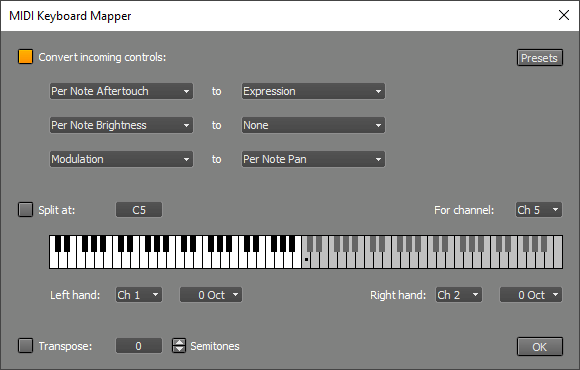 |
- Convert Controls: convert up to 3 incoming controls to a different one. You can use this to map an MPE dimension to a MIDI 2.0 per note control like Modulation, for example.
This feature can also use this to remove events by converting a control to 'None'. You can remove a dimension from an MPE keyboard for example, the 3 MPE dimensions appear as Per Note Pitch Bend, Per Note Brightness and Per Note Aftertouch. - Split: split a MIDI keyboard in a left and right hand part. You can use this if you want to play two instruments using a single keyboard. MIDI messages on one channel are intercepted and separated. All notes below the split note are routed to the left hand channel. All other notes and all controller events are routed to the right hand channel. Each output channel can be transposed up to three octaves up or down.
- Transpose: transpose the input by a number of semitones. You can use this so you can play in a more convenient key.
Autodetect Keyboard Channel
If the Recording options menu's Autodetect Keyboard Channel option is active (this is the default setting) recording MIDI tracks will respond to messages on all channels. This means that you won't have to worry about the actual MIDI channel being used, it just works.
The Autodetect Keyboard Channel feature will disable itself automatically if there are multiple recording MIDI tracks and they're not all recording the same channel. This means that you won't have to turn it off in order to be able to record two tracks using two keyboards.
You can turn off Autodetect Keyboard Channel if data is coming in on multiple MIDI channels and you want to record just one of them.