Noise Gate
The Noise Gate attenuates signals below a certain level. It can be used to remove noise (or headphones recorded by a vocal mic) from a track.
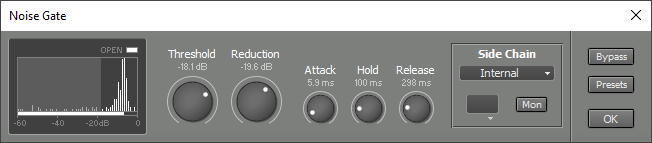 |
Threshold determines the level below which the signal is attenuated. Reduction controls the amount of attenuation applied to signals below the threshold. Applying lots of attenuation can make a Noise Gate slow.
Attack controls the time it takes for the Noise Gate to open (ie. let the signal through). Release controls the time it takes for the Noise Gate to close (ie. attenuate the signal). Attack and Release show the time needed for 60 dB attenuation change. Hold sets an absolute time to wait after the signal drops below the threshold. The release phase starts when the Hold time has elapsed.
The Open indicator lights when the gate is open. This slot itself shows this too.
The Level History on the left shows the relative amount of time the sidechain signal (after effects processing) is at a certain level (the higher the bar, the more time). Also, the current input level is shown horizontally at the bottom. This Level History makes it very easy to set up the threshold. There's a colored 'curtain' on the left side of the display that can be moved using the Threshold knob. The signal bars that are covered by the curtain are muted (the gate is closed). The Level History will be reset automatically when either the Transport is started or the Noise Gate window pops up. You can be reset it manually by pressing the F5 key (Windows) / Command-R (Mac).
In short, setting up the Noise Gate goes like this:
- Make sure the Noise Gate's window is on screen.
- Press the Space bar to start the Transport, play the whole song and press the Space bar again to stop.
- If there are two distinct groups of vertical bars, then adjust the Threshold knob so that the 'curtain' covers the left group. If there's just one group, or two groups that aren't separated very well, then you can try using an EQ effect in the Side Chain section.