Vocal Pitch Correction
The audio track editors feature vocal pitch correction powered by Zynaptiq's ZTX technology. It's typically easier to use the Vocal Tuner effect instead. Using the editor options can be a better choice in these situations:
- The vocal track is stereo (the Vocal Tuner is a mono effect).
- You want to use a MIDI guide track (see below).
- You want to fix a small number of issues only.
 |
Basic pitch correction
Pitch correction is very easy if the vocal track is just a little bit out of tune:- Select the part you want to process in the track's editor.
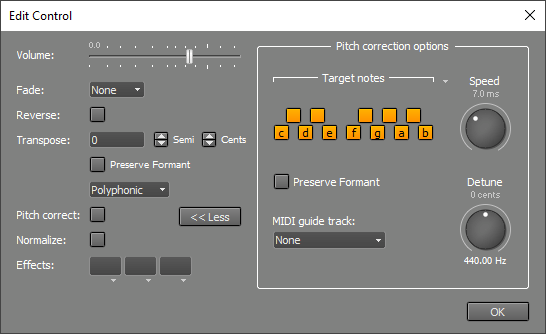
- Click the editor's Edit button to pop up the Audio Edit Control.
- Click the Pitch Correction button.
The More button shows more pitch correction controls. Speed controls the speed of the pitch correction. If it's fast the result will sound synthetic (the "Cher effect"). If it's too low the first part of a note may not be fully pitch corrected. Detune can be used if the song isn't in concert pitch.
Excluding notes
If the vocal track has severe pitch problems you may find that the Basic pitch correction method produces the wrong notes. That happens if the vocals are so much out of tune it's closer to a neighboring note than to the intended note. You can exclude notes to solve this problem:- In the Audio Edit Control click the More button to show the "Pitch correction options".
- In the "Target notes" section you can turn off notes which aren't in the selected vocal part. After applying pitch correction the vocal track will have "on" notes only. Clicking the down arrow pops up a menu which offers various presets like major and minor scales.
Changing the melody
If excluding notes doesn't give you enough flexibility, or if you want to change the melody, you can use a MIDI track to specify the notes. If you don't have a suitable MIDI track already you can use the built-in audio to MIDI conversion feature to create a MIDI track:- Add a MIDI track using the "Add Track" menu.
- Open the MIDI track's editor and the vocal track's editor.
- In the vocal track editor select the part you're interested in, drag it to the MIDI track editor and drop it there.
- In the Audio Edit Control make sure the "Pitch correction options" are visible.
- Select the MID track in the "MIDI guide track" box.
If you're not happy with the results you can edit the MIDI track. Then go to the Audio Edit Control, the changes will now be applied automatically.
Preserve Formant can be used if the pitch changes more than approx. a semitone.
Note: the "Target Notes" section can still be used while using a MIDI guide track, but it only affects the parts where no MIDI notes are playing.