Songs
MultitrackStudio project files are called "songs". A song file (.hdr file extension) contains all information required to reproduce the mix you created. This includes:
- The number of tracks and other mixer sections.
- The position of all their knobs, effects, names of audio/MIDI files, etc.
- Sample rate used
- Song comments
- Chords and lyrics
- Markers
A song file does not include any audio or MIDI data. It contains only references to the audio/MIDI files used by the tracks (i.e., these audio/MIDI files are needed in order to play back the song). All filenames stored in the song file use a relative path whenever possible. This allows projects to be moved easily to other drives or folders.
Note: The devices used for playing audio and MIDI are NOT part of the song file. This way, songs can be used on any computer.
Mac note: Finder will show the song files as Radiance files. If you want to be able to open songs by double clicking, you can Ctrl-click a song, choose Get Info, and change the "Open with" field to MultitrackStudio.
The currently opened song is shown in the main window's title bar.
The Song menu
The Song menu contains the following options (note that some options are described in other chapters):
- New:
In the New Song window you can type the name of the new song. It will be placed in a folder with the same name automatically unless you browse for a folder yourself.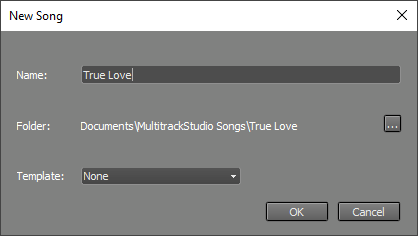
New Song window (Pro edition)
The Templatebox (Pro edition only) lets you apply a template. The Template box also allows you to create new templates: the Save current as template... option creates a template based on the current song. Templates include almost everything related to the song, except for the audio and MIDI data in the tracks. New songs will have empty audio/MIDI files.
There's a special Identical to current song template that creates a new song identical to the current one. This can be convenient for live multitrack recording. - Open: Open a song file.
- Save: Save the song file and all MIDI files and edited audio files (.aem files) opened in tracks.
- Rename: Rename the song.
- Close: Close the song.
- Comments: Read or write text that is stored in the song file. You can use this to document the project.
- Import Song: Import a zipped song (i.e., a song exported using the Export Song option).
Note: the most important export function has its own button in the main window: Mix Down.
Export MIDI Tracks
This tool merges any combination of the MIDI tracks into a single MIDI file. You can use it to move your MIDI tracks to third-party notation software, etc. The current versions of the tracks are used (i.e., the MIDI files are not read from disk), so you can temporarily edit MIDI channels or quantize tracks if necessary.The resulting file is a format 1 MIDI file by default. You can use the Format 0 option if you need a format 0 file (certain hardware can import only format 0, for example).
If a MIDI channel is used by multiple tracks, a message will appear. You can choose "Export as-is" or "Merge Tracks". The first option is best if the file is to be imported into a notation program, etc. The latter option can be used if the file is meant to be played back by a (General MIDI) media player. Note that you'll have to make sure there's just one track playing notes on a particular MIDI channel at any time.
Lyrics, chords, and markers appear in the list if available, and they're checked by default. Lyrics can optionally be stored using UTF-8 encoding, which is typically used for Asian languages.
Note: Chords are stored in Yamaha XF style. The file isn't a full-blown XF file.
Exporting to .midi2 (MIDI Clip File) is possible as well. Either use the Browse button or add ".midi2" to the name yourself. The "Format 0" and "Lyrics as UTF8" buttons do not apply to .midi2 files. Markers can't be stored in .midi2 files at this time.
Export Audio Stems
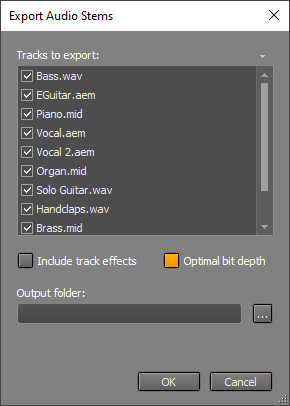 |
This tool can export audio tracks, MIDI tracks using a software instrument, and groups. An audio file will be created for each track or group. You can use this if you're going to have your tracks mixed by someone who doesn't use MultitrackStudio.
If Include track effects is on, any audio effects in the track effect slots will be included. Exported groups include track and group effects regardless of this option.
Optimal bit depth (on by default) makes each file use the lowest bit depth that won't cause any loss of quality for that track. A 16-bit file will be used for a 16-bit track if "Include track effects" is off, for example. 32-bit float files will be used otherwise.
Note: groups are rendered using the tracks routed to the group being rendered. Solo buttons may affect the result. Fancy sidechaining (using other tracks) may not work as expected.
Note: if a MIDI track has multiple streams, only the first stream will be exported. You can click the track's file name box and choose Split Streams to split it into multiple single-stream tracks.
Export Song
"Export Song" saves the song in a .zip file. This makes it easy to move the song to another computer or to iPad. The zip file only contains files required to play back the song, i.e., files not needed will be excluded as determined by the Clean up Song Folder tool.See Transferring Songs for more info.