Song Properties
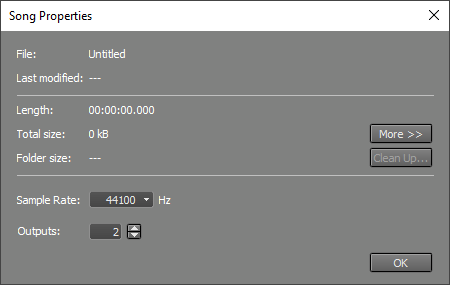 |
The Sample Rate box specifies the sample rate to be used for audio recording/playback. Usually, the default value (44.1 kHz) will be used, as this is the value used on CDs. The bottom entry of the drop-down list lets you make the current value the default for new songs.
Output Channels (Pro edition only) determines the number of audio output channels. This is always an even number. The minimum value is two (stereo), and the maximum value is 140. If the value is greater than 2, all Tracks, Group, and Effect Return sections will have an Output Selector. Note that the Output Channels value can exceed the number of channels the audio device actually has. Any mixer sections using these non-existent channels will not be audible.
The window also shows some non-editable properties. These include:
- The total playing time of the song
- The total occupied disk space
- The file name, playing length, and occupied disk space of each track's file (via the More button)
Clean up Song Folder
The Clean up Song Folder tool analyzes the folder that contains the current song and lists all MultitrackStudio-related files that are not required to play back a song file. You can delete these files to preserve disk space.
Note: Any alternate or partial takes appearing in a track's file options menu appear in the list and can be deleted. Once deleted, the take will no longer be available.
Note: Song version files (.hdrversion) and any tracks used by the versions also appear in the list. If you delete audio files used by a version, that version will no longer play back correctly.