Transport
The transport controls are similar to a tape recorder's transport controls. There's a position indicator and rewind, fast forward, home (to start of song) and start/stop buttons.

When the transport is started all tracks that are in playback mode will play back, and all tracks that are in record mode will record. If there are no tracks that are in either playback or record mode the transport will not start.
Tip: you can hit the space bar instead of clicking the start/stop button.
Position Indicator
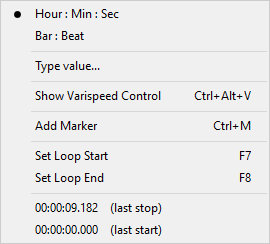 |
The position indicator shows the current transport position. It can show either hours:minutes:seconds or bar:beat. On clicking the position indicator a menu appears which allows for choosing hours:minutes:seconds or bar:beat. The bar:beat option is available only if at least one track contains a MIDI file. That's because tempo information is stored in MIDI files.
After clicking the position indicator menu's Type Value option a new position can be typed. Hours:minutes:seconds values (separated by colons) are interpreted right to left, so you don't have to enter hours or minutes if the time you enter is less than 60 seconds. But if you want to enter minutes you should enter seconds as well. Zero values can be omitted (you can enter 12: instead of 12:00).
Bar:beat values are interpreted left to right, so you can enter plain bar numbers easily (12 instead of 12:1).
The seconds and beat values can be real numbers (like 1.462). Press Enter to accept the new value, or Esc to cancel the operation.
The position indicator's maximum value is 10 hours at 44.1 kHz sample rate (4 hours and 30 minutes at 96 kHz).
Loop mode
If the Loop button is engaged the transport will loop the looping region (assuming you've set a valid region). You can click the position indicator and use the Set Loop Start/Set Loop End options to set the looping region. These options can also be reached by rightclicking the overview bar. The Loop button appears dimmed if it's engaged but there's no valid looping region.
The Overview Bar shows the looping region.

You can select a looping region and start the transport in one go by drawing it on the Overview Bar while pressing the Alt key (Windows) / Option key (Mac).In this case the Loop button will be engaged automatically, and it will be disengaged automatically when transport stops.