Wheel Organ
The Wheel Organ is a software version of the classic B3 tonewheel drawbar organ. All its typical characteristics have been modeled including the key clicks, the scanner vibrato, the tonewheel crossfeed and the harmonic foldback.
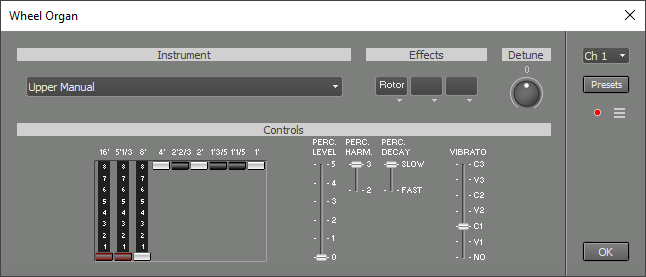 |
Instrument
The Instrument section offers a choice of four different combinations of organ manuals / pedals:- Upper Manual: The upper manual spans five octaves ranging from C3 (note 36) to C8 (note 96).
- Lower and Upper Manual: The lower manual spans five octaves ranging from C0 (note 0) to C5 (note 60). The upper manual spans five octaves (minus the lower C) ranging form C#5 (note 61) to C10 (note 120).
- Pedal, Lower and Upper Manual: The pedal spans two octaves ranging from C0 (note 0) to C2 (note 24). The lower manual spans three octaves (minus the lower C) ranging from C#2 (note 25) to C5 (note 60). The lower manual does not have the lowest and highest octave of the five octave version. The upper manual spans five octaves (minus the lower C) ranging form C#5 (note 61) to C10 (note 120).
- Upper Manual M-type: This one has the same range as the normal Upper Manual instrument. It has no harmonic foldback, and the volume levels of the tonewheels are a bit different.
Effects
The Effects section contains three effect slots. By default, one of them contains a Rotor effect.
Drawbars
The manuals have 9 drawbars each, the pedal has only two. Moving drawbars does not affect notes that are currently playing (unlike the real tonewheel organ's drawbars). The drawbars also serve to set the relative volume levels of the upper/lower manuals and pedal keyboard.
The 8' drawbar is the fundamental tone. The 4', 2 2/3', 2', 1 3/5', 1 1/5' and 1' drawbars correspond to the 2nd, 3th, 4th, 5th, 6th and 8th harmonic respectively. The 16' drawbar is one octave below the fundamental, and the 5 1/3' is the third harmonic of the 16' drawbar's frequency.
Drawbar settings (traditionally called 'registrations') are usually written as a sequence of 9 numbers like 88 8000 000. In this example the three drawbars on the left are pulled out all the way ('8'), while the other six aren't pulled out at all ('0'). 88 8000 000 and 88 8800 000 are widely used, but any other setting can be used.
Percussion
The percussion feature adds a short sound when a key is pressed. The percussion signal is added to a new note only if there's no other key being pressed, so the percussion can be controlled by playing 'legato'. Percussion is applied to the upper manual only.
Perc. Level controls the level of the percussion signal (off, 1..5). The original tonewheel organ has only two levels: 'Soft' (equals '5') and 'Normal' (equals '3'). A few more levels have been added to the Wheel Organ, as tweaking the precussion level is one of the most popular modifications to tonewheel organs. Perc. Harm. controls whether the percussion signal is the 2nd or 3th harmonic of the note being played, these harmonics correspond to the 4' and 2 2/3' drawbars respectively. Perc. Decay controls the decay time of the percussion signal (slow or fast).
Vibrato
The vibrato control has seven positions: Off, V1/2/3 and C1/2/3. Most, if not all, of the time one of the C (Chorus) positions will be used. The V positions provide Vibrato. Vibrato is applied to all manuals and pedals.
Playing instrument 2 or 3 with one MIDI keyboard
MultitrackStudio's Keyboard Mapper can be used to play instrument 2 or 3 using only one MIDI keyboard. Follow these guidelines to set up the Keyboard Mapper:- Enable the Split option.
- Make sure the Left Hand and Right Hand section's Channel values equal the Channel Indicator in the top-right corner of the Wheel Organ window.
- The Split Note can be set at C5 for a start.
- The Left Hand Transpose Oct can be set at -3, the Right Hand Transpose Oct can be set at 2.
Playing instrument 2 or 3 with two MIDI keyboards
MultitrackStudio Pro supports multiple MIDI In devices. Instrument 2 or 3 can be played using two MIDI keyboards if the MIDI keyboards have an octave-shift function. Using 5-octave keyboards, the lower keyboards will be shifted 3 octaves down, and the upper keyboard will be shifted 3 octaves up.
MIDI Implementation
The Wheel Organ responds to Volume (#7), Expression (#11) and Sustain (#64) controllers. Pitch Bend is also supported. Note that the original tonewheel organ didn't have Sustain or Pitch Bend features.
The upper manual drawbars respond to #12 to #20, the lower manual drawbars respond to #21 to #29, the pedal drawbars respond to #30 and #31.
Percussion can be controlled with #70 (volume), #71 (decay) and #72 (harmonic).
Vibrato can be controlled with #76.
The Rotor effect's rotation speed can be controlled with the Modulation (#1) controller.