MIDI-CI
MIDI-CI is part of MIDI 2.0. It allows a sender to receive information from a receiver. MultitrackStudio supports MIDI-CI Profiles and Property Exchange.
Note: on Windows, Windows MIDI Services is required for MIDI-CI to work with MIDI Out Devices.
Note (Pro edition): MIDI-CI is supported for the first MIDI In Device only.
Bidirectional connections
MIDI-CI requires a connection in both directions. A bidirectional connection is detected automatically for USB MIDI 2.0 class-compliant devices. On Windows, this requires Windows MIDI Services. On Mac, this requires macOS 15.4.1.
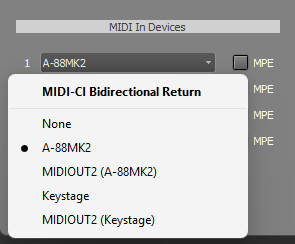 |
Tip: MIDI-CI connections are re-started when the Devices window closes. You can do this if it has stopped working.
Profiles
A profile is a set of specifications. If a profile is enabled on a device, it conforms to the specifications involved. Profiles make MIDI easier to use because the sender (keyboard or MultitrackStudio) knows some things about the MIDI instrument it's connected to, and can adjust accordingly. In addition, exported MIDI files include the profile, so that any device that supports the profile can play the file back correctly.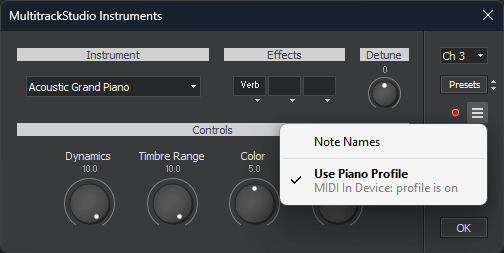 |
The "MIDI In Device" line reports the status of the keyboard: it can be "profile is on", "profile is off", "profile not supported", "not bidirectional", "not present" or "not in use". The latter means the MIDI instrument isn't responding to the keyboard, this is the case while the track is playing back for example.
Piano Profile
The piano profile defines note velocity and sustain pedal curves optimized for piano. If your keyboard supports this, the profile will automatically be enabled on the keyboard while you're using a MIDI instrument that supports it, so the curves match perfectly. The piano profile is supported for the MultitrackStudio Instruments (acoustic pianos), External MIDI Instruments, CLAP plugins and VST3 plugins.Drawbar Organ Profile
The Drawbar Organ profile defines RPNs for the drawbars (and more). The profile is supported for MultitrackStudio Instruments (Drawbar Organ and Percussive Organ), Wheel Organ (single manual instruments), External MIDI Instruments, CLAP plugins and VST3 plugins.Rotary Speaker Profile
The Rotary Speaker profile defines an RPN for the rotor speed (and more). The profile is supported for MultitrackStudio Instruments and Wheel Organ (Rotor in effect slot), External MIDI Instruments, CLAP plugins and VST3 plugins.Orchestral Articulation Profile
The Orchestral Articulation profile doesn't appear in the list mentioned above, as this profile is always enabled on the MIDI instrument if it's available. For more info see the Articulations chapter.Default Drum Note Map Profile
The Default Drum Note Map profile indicates the GM/GM2 drum note mapping is used. This profile doesn't appear in the list mentioned above, as it's always enabled on the MIDI instrument if it's available. The profile is supported for MultitrackStudio Instruments (Drums), External MIDI Instruments and CLAP plugins. This profile is saved in .midi2 files only, not in .mid files.Tip: For External MIDI Instruments, the Piano and Default Drum Note Map profiles can be force-enabled using a patchmap file.
Note: MultitrackStudio currently can't turn a profile on or off on a VST3 plugin. This is a VST3 limitation. The plugin can turn the profile on or off, and notify MultitrackStudio. For plugin developers: A profile is assumed to be active on the plugin if IMidiMapping2 returns all RPNs required by the profile (or any of the RPNs defined by the profile if none are required).
Note: Profiles don't work in macOS 10.14 and 10.15 because the system intercepts some MIDI messages.