New in MultitrackStudio 11.4
- Windows on ARM version (ARM64EC)
- MultitrackStudio Instruments drums improvements
- MIDI 2.0 Piano Profile
- More MIDI-CI Profiles
- Windows MIDI Services-ready
- Efficiency and reliability
- Other
1. Windows on ARM version (ARM64EC)
The Windows installer now includes an ARM64EC version, which will be installed if you install MultitrackStudio on a Windows 11 computer with a Snapdragon CPU. It runs faster than the regular 64-bits version under emulation. The EC in ARM64EC stands for "Emulation Compatible", which means existing x64 plugins (for Intel CPUs) can be used with the ARM64EC version of MultitrackStudio. Such a plugin runs under emulation, while MultitrackStudio itself benefits from using the CPU natively. A plugin which has been updated to support ARM64EC won't run under emulation.2. MultitrackStudio Instruments drums improvements
- Better sounds with better dynamics.
- Tone knobs for Bass, Snare, Toms and Ride.
- Cymbals and toms can be choked. For ride, there's a Ride Choke controller, poly aftertouch is used for the other instruments.
- Hihat Pedal controller, controls openness of "Open Hi Hat" note.
- Can be played with an electronic drum kit. Some MIDI messages will be translated automatically while recording.
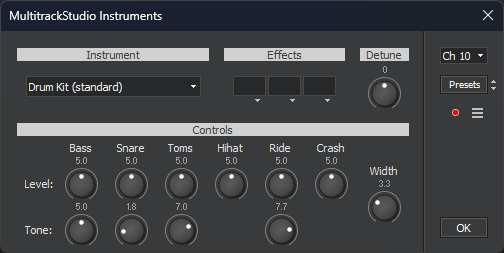
The Onscreen MIDI Keyboard's Drums layout now has a Choke button, it sends per-note aftertouch.
3. MIDI 2.0 Piano Profile
The MultitrackStudio Instruments acoustic pianos support the MIDI 2.0 Piano Profile, which defines velocity and sustain pedal curves for piano. When paired with a compatible keyboard, like the Roland A-88 mk2, the profile is automatically enabled on the keyboard while one of the acoustic pianos is in use so the instrument instantly feels right, with no manual setup required.The MultitrackStudio Instruments acoustic pianos have been improved (again).
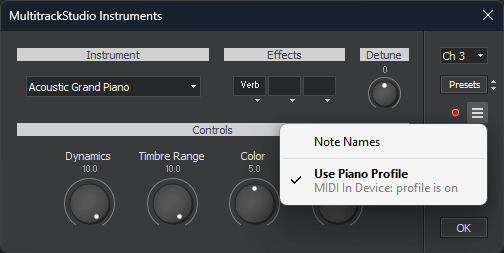
The Piano Profile is supported for External MIDI Instruments, CLAP plugins and VST3 plugins as well. The instrument/plugin needs to support it too, of course.
More info on MIDI-CI profiles follows below.
4. More MIDI-CI Profiles
MIDI-CI is part of MIDI 2.0. It allows a sender to receive information from a receiver. A profile is a set of specifications. If a profile is enabled on a device, it conforms to the specifications involved. Profiles make MIDI easier to use because the sender (keyboard or MultitrackStudio) knows some things about the MIDI instrument it's connected to, and can adjust accordingly. In addition, exported MIDI files include the profile, so that any device that supports the profile can play the file back correctly.A MIDI Instrument's Options menu, available via the ☰ button, lists the profiles which are supported by the instrument (see the Piano Profile picture). The checkmark on the left means the profile is enabled on the MIDI instrument. MultitrackStudio manages profiles automatically, so you typically won't have to enable or disable them yourself.
The "MIDI In Device" line reports the status of the keyboard: it can be "profile is on", "profile is off", "profile not supported", "not bidirectional", "not present" or "not in use". The latter means the MIDI instrument currently isn't responding to the keyboard, this is the case while the track is playing back for example.
In addition to the Piano Profile, the following profiles are supported:
Drawbar Organ Profile
The Drawbar Organ profile defines RPNs for the drawbars (and more). The profile is supported for MultitrackStudio Instruments (Drawbar Organ and Percussive Organ), Wheel Organ (single manual instruments), External MIDI Instruments, CLAP plugins and VST3 plugins.Rotary Speaker Profile
The Rotary Speaker profile defines an RPN for the rotor speed (and more). The profile is supported for MultitrackStudio Instruments and Wheel Organ (Rotor in effect slot), External MIDI Instruments, CLAP plugins and VST3 plugins.Orchestral Articulation Profile
The Orchestral Articulation profile doesn't appear in the list mentioned above, as this profile is always enabled on the MIDI instrument if it's available. For more info see the Articulations chapter.Default Drum Note Map Profile
The Default Drum Note Map profile indicates the GM/GM2 drum note mapping is used. This profile doesn't appear in the list mentioned above, as it's always enabled on the MIDI instrument if it's available. The profile is supported for MultitrackStudio Instruments (Drums), External MIDI Instruments and CLAP plugins. This profile is saved in .midi2 files only, not in .mid files.5. Windows MIDI Services-ready
Windows MIDI Services is the brand-new MIDI stack for Windows, supporting both MIDI 1.0 and MIDI 2.0. It started rolling out to Windows 11 computers a couple of weeks ago. If Windows MIDI Services is present on a computer, the old MIDI 1.0 API is routed through Windows MIDI Services, so MultitrackStudio still works like it used to.For apps to use Windows MIDI Services directly (without the limitations of the old API), the MIDI Services Runtime must be installed. Microsoft is currently in the process of finishing this runtime, and making it publicly available. MultitrackStudio is ready to use this runtime.
The runtime enables MIDI 2.0 support in MultitrackStudio, so you can take advantage of the higher resolutions of MIDI 2.0 devices. It also allows MultitrackStudio for Windows to use MIDI-CI to retrieve program names and controller names from an External MIDI Instrument. The Mac version has this for some time already, see version 10.7.
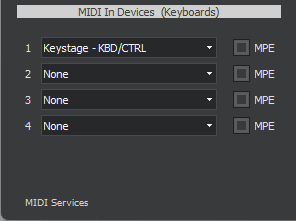
Once the runtime is available, and you've installed it, the bottom-left corner of the Devices window will read "MIDI Services".
6. Efficiency and reliability
- Mac: the Apple Silicon version has more efficient audio processing.
- Tweaks to audio engine to make it more efficient, and cause less CPU spikes.
- Windows: "Windows" audio driver type Shared Mode works better.
7. Other
- Mac: MIDI 2.0 devices now appear in lists as a single nicely named item (macOS 15.4.1 and newer).
- MultitrackStudio Instruments: almost all instruments sound better.
- Guitar Amp effect has smoother overdrive sound.
- Stereo Imager: the Comb filter option now keeps low frequencies present in both channels.
- New "Mid-Side to Stereo" preset for Stereo Effect.
- Fixed: Saturator "Tube" program no longer inverts phase.